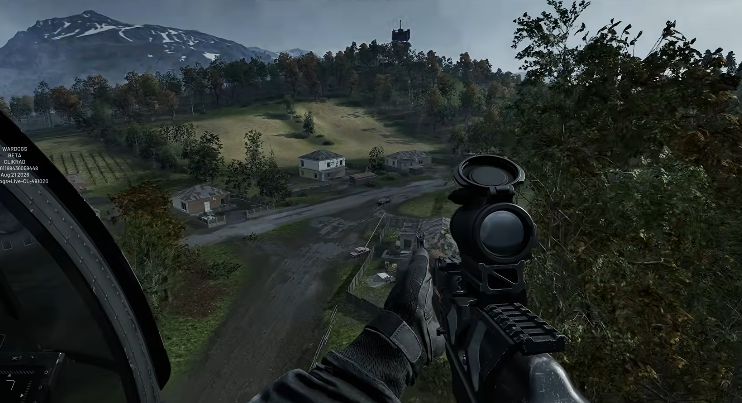
The most counterintuitive thing about WARDOGS logistics crates? They’re not for storing things. They’re for moving them. Treating them like a glorified backpack is exactly why your supply lines collapse the moment the shooting starts, and why you’re always scrambling for ammo while your squad is getting pinned down. The crate system rewards players who think in flows, not in inventories.
This guide breaks down how to use logistics crates and pallets the way the game’s mechanics actually intend, from the moment you land to the final objective push. By the end, you’ll stop treating crates as furniture and start treating them as the lifeline they’re designed to be.
What Logistics Crates Actually Do (And What They Don’t)
Logistics crates in WARDOGS serve a single, focused purpose: they let you store and redistribute gear outside your personal loadout. That sounds simple, but the implications are where most players get lost. A crate is not a safety deposit box. It’s a temporary transfer point between you, your squad, and the fight.
Pallet jack and crate placement matter more than what’s inside them. You could stock a crate with top-tier rifles and medical supplies, but if it’s sitting in a corner of the map nobody controls, it might as well be empty. The value comes from positioning, timing, and knowing when to break the crate down entirely.
The Core Rule: Crates Are Transient, Not Permanent
Here’s the mental shift that changes everything. You should be able to look at any crate you’ve placed and explain, in one sentence, where the gear inside is going next. If you can’t, you’ve made a storage mistake. Common failure: players hoard supplies “just in case,” then lose the crate when the objective shifts or the squad gets wiped.

In practice, this means:
- Stock for the next fight, not the whole match. A crate loaded with 15 minutes of spare ammo is a crate that will be abandoned.
- Place crates near active or likely objective rotations. Not at spawn. Not in some hidden bush. Near where your squad will actually need to reload or resupply.
- Dismantle and relocate when the front moves. A crate that’s out of position is dead weight. Grab the pallet, move it, restock it.
Step 1: Setting Up Your First Crate Drop
When you first call in a logistics crate, you’re committing to a location. Do it with intention. Open your map, check the current objective, and ask where the next engagement is likely to happen. That’s your spot.
Drop the crate, then immediately open it and sort your supplies. Don’t wait. The longer a crate sits unopened, the longer your squad is fighting without access to what’s inside. Assign roles right then: one player handles the pallet jack, one player calls out resupply requests, one player guards the crate if the area is hot.
Expected outcome: A crate that’s operational within 30 seconds of landing, with gear organized by category (ammo, medical, explosives) so players can grab and go without rummaging.
Step 2: The Pallet Jack Is Your Best Friend
Most players ignore the pallet jack entirely. That’s a mistake. The pallet jack lets you move an entire crate’s worth of supplies without opening it, which means you can reposition logistics assets under fire or when the tactical situation shifts.
The trick is to treat the pallet jack as a support role, not a transport gimmick. One player on pallet duty can keep a crate following the squad’s advance, ensuring that resupply is always within sprinting distance. That’s a massive advantage over a static crate that gets left behind.
Here’s the comparison table that shows how the different logistics approaches stack up in actual play:
| Approach | Setup Time | Mobility | Risk | Best Use Case |
|---|---|---|---|---|
| Static crate, no pallet | Fast (10 sec) | None | High (gets abandoned) | Early match, known static objective |
| Crate + dedicated pallet operator | Moderate (30 sec) | Full squad speed | Medium | Mid-match, rotating objectives |
| Multiple small caches, no pallets | Slow (2+ min) | Low | Very high (supplies scattered) | Defensive holds, fortified positions |
Notice the middle row. That’s the one that wins matches. The dedicated pallet operator is a role worth assigning, even if it means one less gun in the firefight. Because that one player is keeping your entire squad operational.
Step 3: Organizing Crate Contents for Speed
A disorganized crate is a death sentence. When your squad is under fire and needs a medkit, nobody wants to scroll through 40 items to find it. Organize by category, and make it consistent across every crate you place.
Practical setup:
- Top shelf: Medical supplies (medkits, bandages, stims)
- Middle shelf: Primary ammo types, sorted by caliber
- Bottom shelf: Explosives, grenades, and heavy equipment
This takes 60 seconds to set up. It saves your squad minutes of fumbling during a firefight. The math is simple, and the payoff is immediate.
Expected outcome: Squad members can identify and grab the right item in under 5 seconds, even under pressure.
Step 4: When to Break Crates Down and Move
The moment your current objective is secured, start planning the relocation. Don’t wait until the next objective is announced. That’s when everyone scrambles, and that’s when crates get left behind.
The signal is simple: the fight is over, and your squad is moving. That’s your cue. One player grabs the pallet jack, another confirms the crate’s contents are worth moving, and a third covers the relocation route. If the crate is low on supplies, dismantle it and redistribute what’s left among the squad. Don’t drag an empty crate across the map.
Expected outcome: Your logistics assets are always within one objective of the current fight. No crate is more than 90 seconds away from being useful.
Step 5: The Squad Coordination Piece
Crates only work if your squad knows they exist. Call out when you place one. Call out when you move one. Call out when you’re low on a specific supply. A silent crate is a wasted crate.
This means the pallet operator needs to be vocal. They should be announcing position updates and supply counts regularly. If your squad is the type that plays without mics, this system still works, but it’s slower. You’ll rely on visual cues and map markers instead of callouts.
Expected outcome: Every squad member can answer two questions at any moment: “Where is the nearest crate?” and “What’s in it?”
The Windows Performance Angle (Because WARDOGS Is Demanding)
WARDOGS is not a light game. If your system is struggling with stutters or crashes while you’re managing logistics, all the crate strategy in the world won’t help. The game’s anti-cheat and background processes have caused issues for many players, particularly with Windows security updates from August 12th that conflict with kernel-level processes.
A common culprit is the process input x64.syscodecodecodecode, which has been known to crash WARDOGS and other games with anti-cheat. Disabling it via command prompt (running as admin) has resolved nonstop crashing for some players, turning a game that crashed every few seconds into one that runs for 24+ hours without a single crash. If you’re experiencing crashes, check your Event Viewer after a crash for a red exclamation mark and see if that process is named.

The fix involves two commands that stop the process and prevent it from auto-starting, followed by a full PC restart. This is worth doing before you blame your crate strategy for a performance problem that’s actually a system issue.
When the System Fails: Uninstalling Recent Windows Updates
Sometimes the problem isn’t the game or your logistics setup. It’s Windows itself. If WARDOGS started crashing after a recent Windows update, you can roll it back. Go to Windows Update, click Update History, then Uninstall Updates. Remove the most recent update and restart your PC.
This is a blunt instrument, but it works. It’s also worth checking your BIOS version and updating it if you’re behind, especially on laptops where power delivery can affect game stability. Updated graphics drivers are a given, but ensure you’re on the latest Game Ready driver from Nvidia or the equivalent from AMD, ideally with a clean installation.
The Bottom Line on Crates
Logistics crates and pallets are a flow mechanic, not a storage mechanic. The players who win with them are the ones who keep their supplies moving, keep their crates organized, and keep their squads informed. Static caches are for games that don’t have objectives. WARDOGS does.
One edge case worth noting: in the final minutes of a match, when the objective is locked and the fight is all-in, a static crate becomes viable again. If you’re defending a fixed point, dump everything into place and make your stand. The rules change when the map stops moving.
That’s the nuance most guides miss. The best logistics players know when to break the rules, not just when to follow them.






/i.s3.glbimg.com/v1/AUTH_08fbf48bc0524877943fe86e43087e7a/internal_photos/bs/2026/Y/y/eloBAuRYqsg3YH6XQqQQ/imagem-2026-09-10-200407901.png "WARDOGS Early Access: Why “Just Wait for Full Release”")
